

Why use loops?
Loops let you execute a block of code repeatedly without rewriting it. They’re great for:
- Going through arrays or lists
- Repeating actions until a condition is met
- Executing something a fixed number of times
- Automating repetitive tasks
Types of Loops
1. for Loops
for (initialization; condition; increment)
{
    // code to run
}
Example:
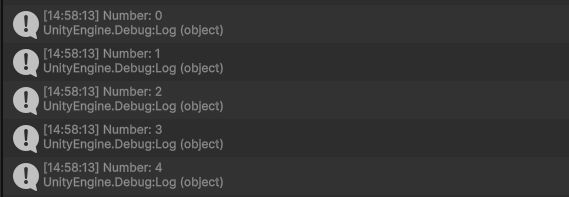
for (int i = 0; i < 5; i++)
{
    Debug.Log("Number: " + i);
}- int i = 0: Start with i = 0
- i < 5: Continue loop while i is less than 5
- i++: Add 1 to i every time the loop runs
Console Output:
2. foreach Loop
foreach (type element in collection)
{
    // code to run
}
Example:
string[] enemies = { "Goblin", "Orc", "Dragon" };

foreach (string enemy in enemies)
{
    Debug.Log("Enemy: " + enemy);
}
Explanation:
- Runs once for each item in the collection
enemyis the current item in the loop
Possible use cases:
- Iterating through arrays or lists
- Checking every item in an inventory
3. while Loop
while (condition)
{
    // code to run
}
Example:
int i = 0;
while (i < 3)
{
    Debug.Log("i is " + i);
    i++;
}
Explanation:
- As long as the condition is true, the loop continues
- Be careful: If the condition is never false, the loop runs forever!
Possible use cases:
- Waiting for a condition to change
- Game states (e.g., waiting for a boss to appear)
4. do-while Loop
Structure:
do
{
    // code to run
}
while (condition);
Example:
int i = 0;
do
{
    Debug.Log("This runs at least once: " + i);
    i++;
}
while (i < 2);- Executes the code at least once before checking the condition
Potential use cases:
- Menu loops
- Input prompts that must appear at least once
WARNING: Infinite Loops — Be Careful
Loops should always reach a point where they evaluate to false, or else they will run forever –hence the name “Infinite Loops”.
while (true)
{
    Debug.Log("This never ends!");
}
This crashes your game/program unless you have a break condition.
Loop Control Keywords
break: Exit the Loop Early
for (int i = 0; i < 10; i++)
{
    if (i == 5)
        break;

    Debug.Log(i);  // Stops at 4
}continue: Skip to the Next Iteration
for (int i = 0; i < 5; i++)
{
    if (i == 2)
        continue;

    Debug.Log(i);  // Skips 2
}
Unity + Loops: Practical Use Cases
Spawning GameObjects
public GameObject enemyPrefab;

void Start()
{
    for (int i = 0; i < 5; i++)
    {
        Vector3 spawnPosition = new Vector3(i * 2, 0, 0);
        Instantiate(enemyPrefab, spawnPosition, Quaternion.identity);
    }
}
Iterating Through GameObjects
GameObject[] enemies = GameObject.FindGameObjectsWithTag("Enemy");

foreach (GameObject enemy in enemies)
{
    enemy.GetComponent<Enemy>().TakeDamage(10);
}
Checking for Nearby Objects (with foreach)
Use Case: Apply an effect to nearby enemies (AOE damage, slow, etc.)
Power: React to spatial data–huge in combat systems and interactions
public float range = 5f;

void Explode()
{
    Collider[] hitColliders = Physics.OverlapSphere(transform.position, range);
    foreach (Collider hit in hitColliders)
    {
        if (hit.CompareTag("Enemy"))
        {
            hit.GetComponent<Enemy>().TakeDamage(50);
        }
    }
}
Repeating an Animation or Effect Over Time (with Coroutine + while)
Use Case: Make something pulse, glow, flicker, etc.
Power: Clean timing-based visuals without Update()
IEnumerator FlickerLight(Light target)
{
    float t = 0f;
    while (t < 3f) // flicker for 3 seconds
    {
        target.enabled = !target.enabled;
        yield return new WaitForSeconds(0.1f);
        t += 0.1f;
    }
    target.enabled = true; // restore
}
Object Pool Initialization (with for)
Use Case: Create a pool of reusable bullets or enemies.
Power: Use loops for performance optimization.
public GameObject bulletPrefab;
public int poolSize = 20;
private List<GameObject> bullets = new List<GameObject>();

void Start()
{
    for (int i = 0; i < poolSize; i++)
    {
        GameObject bullet = Instantiate(bulletPrefab);
        bullet.SetActive(false);
        bullets.Add(bullet);
    }
}
Animate a UI Progress Bar (Coroutine + for)
Use Case: Smoothly animate UI fill values.
Power: Satisfying feedback for crafting, loading, stamina, etc.
public Image progressBar;

public IEnumerator AnimateBar(float duration)
{
    for (float t = 0; t <= duration; t += Time.deltaTime)
    {
        progressBar.fillAmount = t / duration;
        yield return null;
    }

    progressBar.fillAmount = 1f;
}
Loop Through Player Inventory (foreach)
Use Case: Display inventory or use items.
Power: UI/UX and player systems depend on iterating collections cleanly.
public List<Item> inventory;

void ShowInventory()
{
    foreach (Item item in inventory)
    {
        Debug.Log("Item: " + item.name);
    }
}
Coroutines + Loops in Unity
What is a coroutine?
A Coroutine is a special method in Unity that allows you to pause execution, wait for a condition or time, then continue–all without blocking the main thread. For detailed information about Coroutines, visit the page on Coroutines HERE.
Why use coroutines?
- Wait a few seconds before doing something
- Spread out heavy operations over multiple frames
- Control complex animations, cutscenes, effects
How to Start a Coroutine
StartCoroutine(MyCoroutine());A coroutine must return IEnumerator.
Loop Control Inside Coroutines
break / continue still work as expected:
IEnumerator FlashObject()
{
    for (int i = 0; i < 10; i++)
    {
        if (i == 5) break; // Stop flashing halfway

        ToggleVisibility();
        yield return new WaitForSeconds(0.2f);
    }
}

void ToggleVisibility()
{
    // toggle sprite visibility or mesh renderer
}
Example 1: for Loop + Coroutine
Spawn 5 objects, 1 second apart
public GameObject prefab;

IEnumerator SpawnObjects()
{
    for (int i = 0; i < 5; i++)
    {
        Instantiate(prefab, new Vector3(i * 2, 0, 0), Quaternion.identity);
        Debug.Log("Spawned: " + i);
        yield return new WaitForSeconds(1f); // Wait 1 second
    }
}
Start it:
void Start()
{
    StartCoroutine(SpawnObjects());
}
Example 2: while Loop + Coroutine
Wait until a condition is true
public bool bossDefeated = false;

IEnumerator WaitForVictory()
{
    Debug.Log("Waiting for boss to die...");
    while (!bossDefeated)
    {
        yield return null; // Wait one frame
    }
    Debug.Log("Boss defeated! Next level...");
}
Example 3: do-while Loop + Coroutine
Repeat a healing effect every second
IEnumerator HealOverTime(int totalHeals, float interval, int amount)
{
    int healsDone = 0;

    do
    {
        Heal(amount);
        healsDone++;
        yield return new WaitForSeconds(interval);
    }
    while (healsDone < totalHeals);
}

void Heal(int amount)
{
    Debug.Log("Healed " + amount + " HP");
}
Example 4: foreach + Coroutine
Fade multiple UI elements over time
public List<CanvasGroup> uiElements;

IEnumerator FadeAll()
{
    foreach (CanvasGroup cg in uiElements)
    {
        StartCoroutine(FadeOut(cg));
        yield return new WaitForSeconds(0.2f);
    }
}

IEnumerator FadeOut(CanvasGroup cg)
{
    while (cg.alpha > 0)
    {
        cg.alpha -= Time.deltaTime;
        yield return null;
    }
}
BONUS: Infinite Loop Safely
You can simulate an infinite loop that’s non-blocking:
IEnumerator Blink()
{
    while (true)
    {
        ToggleLight();
        yield return new WaitForSeconds(0.5f);
    }
}
Just be sure to call StopCoroutine or StopAllCoroutines when needed.
Tips
- Use yield return null to wait one frame
- Use yield return new WaitForSeconds(t) to wait for seconds
- You can nest coroutines using yield return StartCoroutine(SomeOtherRoutine());